Split a segment into multiple activities
One 34-minute segment labeled City Driving might actually be: 10 minutes driving to the lot, 15 minutes of parking practice, 9 minutes driving home. Split Time turns that single block into three honest rows without re-driving it.
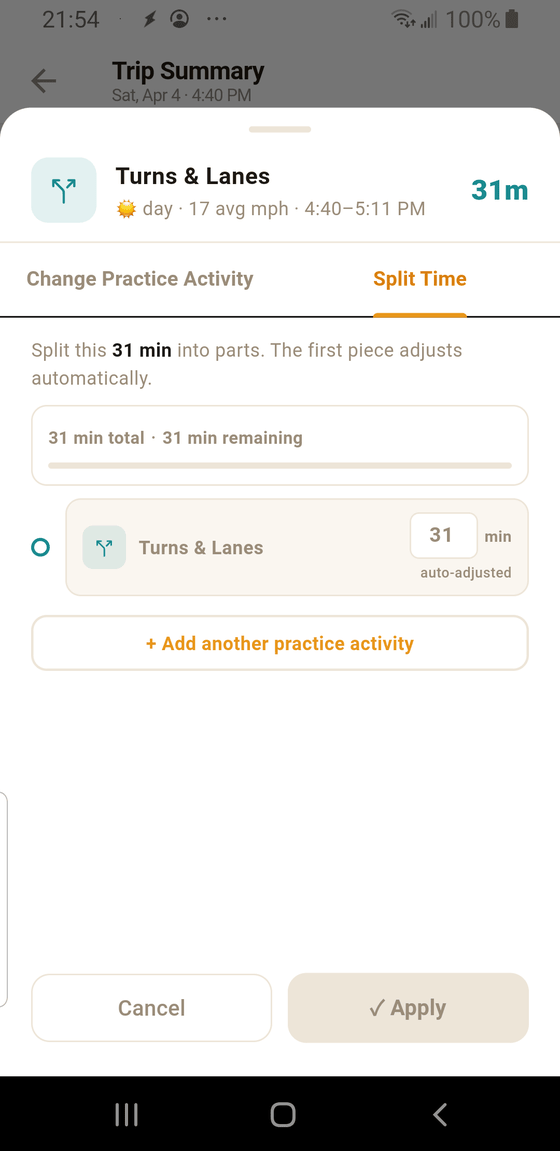
- 1 Split Time tab. The middle of the three tabs on the segment edit sheet. This is where you break one segment into pieces.
- 2 Total and remaining. The original segment's total (here, 34 min) never changes. "Remaining" is how many minutes still belong to the first piece after the other pieces take theirs.
- 3 Auto-adjusted first row. You can't edit the first activity's minutes directly — it's whatever's left over. This keeps the split arithmetic simple: the sum always equals the original duration.
- 4 + Add another practice activity. Tap to add a second, third, or fourth piece. Each piece picks its own category from the 10-tile grid and sets its own minutes.
When splitting helps
- Parking inside a shopping-center visit. A 20-minute trip to the store that included 5 minutes of parking practice should count as both City Driving and Parking.
- Warm-up backing before a real drive. The first 3 minutes of a neighborhood loop — reversing out of the driveway, backing into the street, a 3-point turn — belong in Backing or Turnabouts, not City Driving.
- A long highway leg with one city detour. Expressway is the bulk, but the 7 minutes off the exit to get gas should be City Driving.
Do the pieces have to add up exactly?
Yes — the first piece auto-adjusts so the sum always matches the original total. This is intentional. You can't accidentally inflate or deflate the drive by splitting it.
Removing a piece
Each split piece after the first has a small X on the right. Tap it to remove that piece; the minutes flow back to the first row.
Tip: You don't have to be precise to the minute. "About 15 of the 34 minutes
were parking" is fine — DPS cares that categories were practiced, not that the accounting is
stopwatch-level perfect.