The Trips history
The Trips tab is your paper trail — every recorded drive, grouped by week, with at-a-glance stats per trip. It's the fastest way to find a specific session and re-open its summary if something needs a second look.
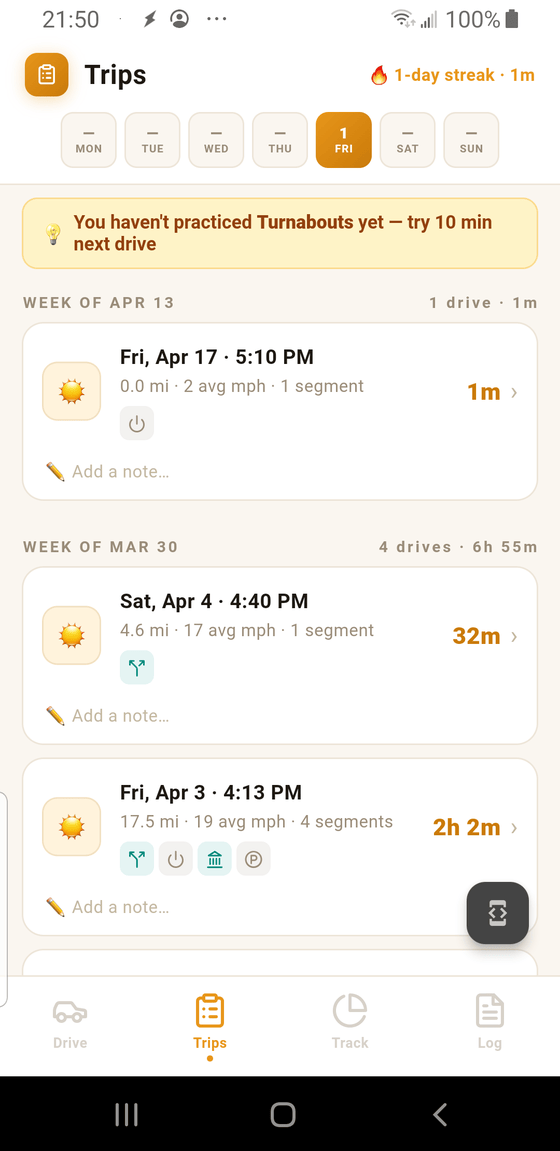
- 1 Streak + today's minutes. A flame icon and "N-day streak" reward you for consecutive days of practice, followed by how many minutes were logged today. Builds the kind of habit that gets a teen through 30 hours without a last-minute crunch.
- 2 Day-of-week strip. Seven tiles for this week. Today is highlighted; tiles for days with any practice show a minute count, blank for days off. Lets you see a full week of activity at a glance.
- 3 Week group aggregate. Each group header shows the total number of drives and total time for that week. Helpful for pacing — you're aiming for a few hours of practice per week.
- 4 Category icons. Small chiclets on each card show which categories that drive touched — a quick visual cue that a drive covered, say, Turns & Lanes, Parking, and City Driving all at once.
What each drive card shows
For every drive you'll see, from top to bottom:
- A sun or moon icon on the left — daytime versus nighttime session.
- The date and start time, e.g. Fri, Apr 3 · 4:13 PM.
- A meta line: distance, average speed, and segment count (17.5 mi · 19 avg mph · 4 segments).
- The category chiclets described in callout 4.
- The total duration on the right, with a chevron (›) — tap anywhere on the card to open the Trip Summary.
- An Add a note… field — type any short reminder for future reference ("first time on I-35," "parallel-parking practice").
The "haven't practiced X yet" tip banner
Above the week groups there's sometimes a yellow tip banner pointing out a category you haven't touched yet — e.g. "You haven't practiced Turnabouts yet — try 10 min next drive." It refreshes periodically and disappears once you've logged something in that category.
Opening a past drive
Tap any drive card to re-open that session's Trip Summary. From there you can see the route, review the segments, or fix a wrong category with the Change › button. Nothing is destructive — the map, stats, and segments are just remembered state, not a fresh drive.